This can be confusing, so here are my notes.
Terminology
MD5: A 32-character string of hexadecimal digits computed by a tool for a specific file. There are several methods such as the openssl command, but using the md5sum command outputs the MD5 value as shown below.
[ec2-user@bastin ~]$ dd if=/dev/zero of=~/test.txt bs=1M count=500
500+0 records in
500+0 records out
524288000 bytes (524 MB) copied, 0.233084 s, 2.2 GB/s
[ec2-user@bastin ~]$ md5sum test.txt
d8b61b2c0025919d5321461045c8226f  test.txt
ETag: An HTTP response header that identifies a specific version of a resource. Whenever something changes about the resource at a URL, the ETag gets a new value.
The AWS explanation of ETag is as follows. Note especially that the ETag value changes depending on the S3 encryption method (SSE-S3 or SSE-KMS), and that objects created by Multipart Upload or Part Copy operations have ETags that are not MD5 digests, regardless of the encryption method.
ETag
The entity tag represents a specific version of the object. The ETag reflects changes only to the contents of an object, not its metadata. The ETag may or may not be an MD5 digest of the object data. Whether or not it is depends on how the object was created and how it is encrypted as described below:
- Objects created through the AWS Management Console or by the PUT Object, POST Object, or Copy operation:
- Objects encrypted by SSE-S3 or plaintext have ETags that are an MD5 digest of their data.
- Objects encrypted by SSE-C or SSE-KMS have ETags that are not an MD5 digest of their object data.
- Objects created by either the Multipart Upload or Part Copy operation have ETags that are not MD5 digests, regardless of the method of encryption.
Pattern 1: Objects Encrypted with SSE-S3 or Plaintext
Bucket Configuration

Multipart Upload Case
Since the file was uploaded via multipart, the hash obtained on the EC2 side differs from the ETag on S3.
[ec2-user@bastin ~]$ dd if=/dev/zero of=~/test.txt bs=1M count=500
500+0 records in
500+0 records out
524288000 bytes (524 MB) copied, 0.23444 s, 2.2 GB/s
[ec2-user@bastin ~]$ md5sum test.txt
d8b61b2c0025919d5321461045c8226f  test.txt
[ec2-user@bastin ~]$ aws s3 cp ~/test.txt  s3://s3-imazaj/
upload: ./test.txt to s3://s3-imazaj/test.txt
[ec2-user@bastin ~]$ aws s3api head-object --bucket s3-imazaj --key test.txt
{
    "AcceptRanges": "bytes",
    "LastModified": "Fri, 17 Dec 2021 13:11:36 GMT",
    "ContentLength": 524288000,
    "ETag": "\"2ab876e6e72b0fe9215ba306bea4f697-63\"",
    "VersionId": "f6twG5M7LGpjOzhGSIm9Tn1lnhnlN_ia",
    "ContentType": "text/plain",
    "ServerSideEncryption": "AES256",
    "Metadata": {}
}
To calculate the ETag, use the following tool (unofficial). You can see that the hash output by s3etag matches the ETag obtained from aws s3api head-object.
[ec2-user@bastin ~]$ gem install s3etag
Fetching: s3etag-0.0.1.gem (100%)
Successfully installed s3etag-0.0.1
Parsing documentation for s3etag-0.0.1
Installing ri documentation for s3etag-0.0.1
1 gem installed
[ec2-user@bastin ~]$ s3etag
s3etag file
    -t, --thre[ec2-user@bastin ~]$ s3etag
s3etag file
    -t, --threshold threshold
    -p, --max-parts max-parts
    -s, --min_part_size min_part_size
[ec2-user@bastin ~]$ s3etag -t 8388608 -s 8388608 test.txt
2ab876e6e72b0fe9215ba306bea4f697-63
The calculation formula is as follows. We specify 8388608 because S3’s default multipart upload splits at 8MB.
Again on ETAG and MD5 checksum for multipart
ETag = MD5(Sum(p \in numberParts, MD5(PartBytes(p))) + "-" + numberParts
- The MD5 values of the split files are summed
- The number of splits is appended after a dash at the end of the summed value.
To get the MD5 value of an object on S3, you can also use the following method.
[ec2-user@bastin ~]$ sudo yum -y install s3cmd
[ec2-user@bastin ~]$ s3cmd ls --list-md5 s3://s3-imazaj/
2021-12-17 13:11    524288000  2ab876e6e72b0fe9215ba306bea4f697-63  s3://s3-imazaj/test.txt
Non-Multipart Upload Case
In this case, MD5 = ETag.
[ec2-user@bastin ~]$ md5sum test.txt
d8b61b2c0025919d5321461045c8226f  test.txt
[ec2-user@bastin ~]$ aws s3api put-object --bucket s3-imazaj --key test.txt --body test.txt
{
    "ETag": "\"d8b61b2c0025919d5321461045c8226f\"",
    "ServerSideEncryption": "AES256",
    "VersionId": "Einc9JkCj2itDk3BDSQJPAu1HoblkzfU"
}
[ec2-user@bastin ~]$ aws s3api head-object --bucket s3-imazaj --key test.txt
{
    "AcceptRanges": "bytes",
    "LastModified": "Fri, 17 Dec 2021 13:20:58 GMT",
    "ContentLength": 524288000,
    "ETag": "\"d8b61b2c0025919d5321461045c8226f\"",
    "VersionId": "Einc9JkCj2itDk3BDSQJPAu1HoblkzfU",
    "ContentType": "binary/octet-stream",
    "ServerSideEncryption": "AES256",
    "Metadata": {}
}
[ec2-user@bastin ~]$ s3cmd ls --list-md5 s3://s3-imazaj/
2021-12-17 13:20    524288000  d8b61b2c0025919d5321461045c8226f     s3://s3-imazaj/test.txt
Pattern 2: Objects Encrypted with SSE-KMS
S3 Bucket Configuration
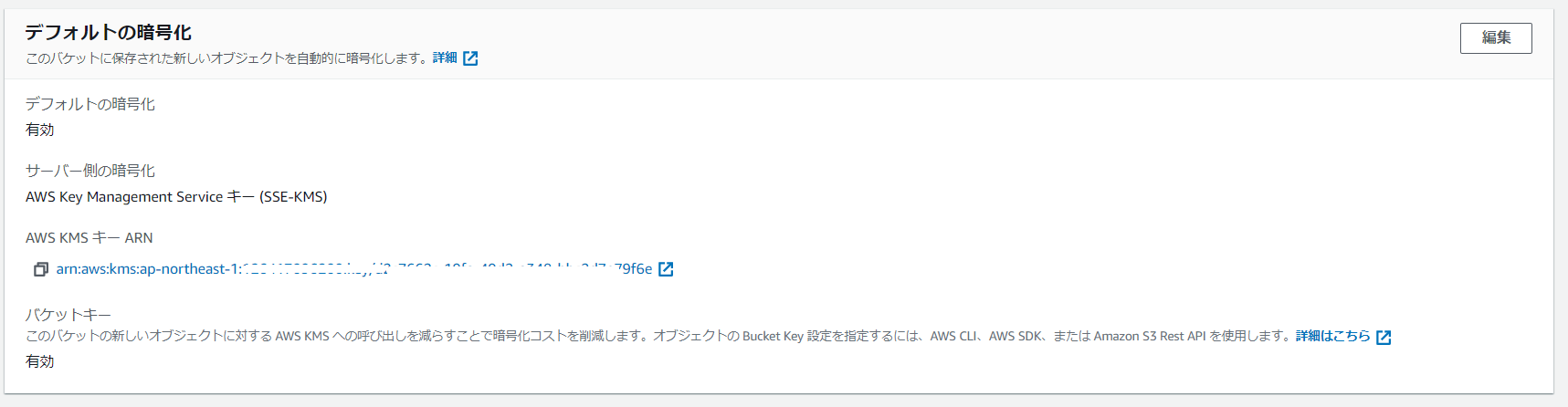
Multipart Upload Case
[ec2-user@bastin ~]$ md5sum test.txt
d8b61b2c0025919d5321461045c8226f  test.txt
[ec2-user@bastin ~]$ s3cmd ls --list-md5 s3://s3-imazaj/
2021-12-17 13:20    524288000  d8b61b2c0025919d5321461045c8226f     s3://s3-imazaj/test.txt
[ec2-user@bastin ~]$ md5sum test.txt
d8b61b2c0025919d5321461045c8226f  test.txt
[ec2-user@bastin ~]$ aws s3 cp test.txt  s3://s3-imazaj/
upload: ./test.txt to s3://s3-imazaj/test.txt
[ec2-user@bastin ~]$ aws s3api head-object --bucket s3-imazaj --key test.txt
{
    "AcceptRanges": "bytes",
    "LastModified": "Fri, 17 Dec 2021 13:24:52 GMT",
    "ContentLength": 524288000,
    "ETag": "\"24a147ee52b41c94f398613a46a06810-63\"",
    "VersionId": "abQHe4HT0IMzx5biXy1olm6NqJKkk8Cs",
    "ContentType": "text/plain",
    "ServerSideEncryption": "aws:kms",
    "Metadata": {},
    "SSEKMSKeyId": "arn:aws:kms:ap-northeast-1:xxxxxxxxxxxxx:key/d2c7662c-19fa-40d2-a348-bbc2d7e79f6e",
    "BucketKeyEnabled": true
}
[ec2-user@bastin ~]$ s3cmd ls --list-md5 s3://s3-imazaj/
2021-12-17 13:24    524288000  24a147ee52b41c94f398613a46a06810-63  s3://s3-imazaj/test.txt
Even using the s3etag tool, the ETag and MD5 values do not match.
[ec2-user@bastin ~]$ s3etag -t 8388608 -s 8388608 test.txt
2ab876e6e72b0fe9215ba306bea4f697-63
Non-Multipart Upload
When encryption is used, even the non-multipart upload case fails.
[ec2-user@bastin ~]$ aws s3api put-object --bucket s3-imazaj --key test.txt --body test.txt
{
    "ETag": "\"dd6006c0c101d532e17cb992b04658b0\"",
    "ServerSideEncryption": "aws:kms",
    "VersionId": "8k7ceRD0TRNWLTmiQlaqersys_0nZgln",
    "SSEKMSKeyId": "arn:aws:kms:ap-northeast-1:xxxxxxxxxxxxx:key/d2c7662c-19fa-40d2-a348-bbc2d7e79f6e",
    "BucketKeyEnabled": true
}
[ec2-user@bastin ~]$ aws s3api head-object --bucket s3-imazaj --key test.txt
{
    "AcceptRanges": "bytes",
    "LastModified": "Fri, 17 Dec 2021 13:26:25 GMT",
    "ContentLength": 524288000,
    "ETag": "\"dd6006c0c101d532e17cb992b04658b0\"",
    "VersionId": "8k7ceRD0TRNWLTmiQlaqersys_0nZgln",
    "ContentType": "binary/octet-stream",
    "ServerSideEncryption": "aws:kms",
    "Metadata": {},
    "SSEKMSKeyId": "arn:aws:kms:ap-northeast-1:xxxxxxxxxxxxx:key/d2c7662c-19fa-40d2-a348-bbc2d7e79f6e",
    "BucketKeyEnabled": true
}