Introduction
In preparation for the GCP Associate Cloud Engineer exam, I reviewed the manual contents described in the exam guide and verified some on actual equipment, studying according to the exam guide. The following five major topics are covered in the exam:
- Setting up cloud solution environments
- Planning and configuring a cloud solution
- Deploying and implementing a cloud solution
- Ensuring successful operation of a cloud solution
- Configuring access and security
The exam guide further subdivides these major topics, and specific exam items are set as follows:
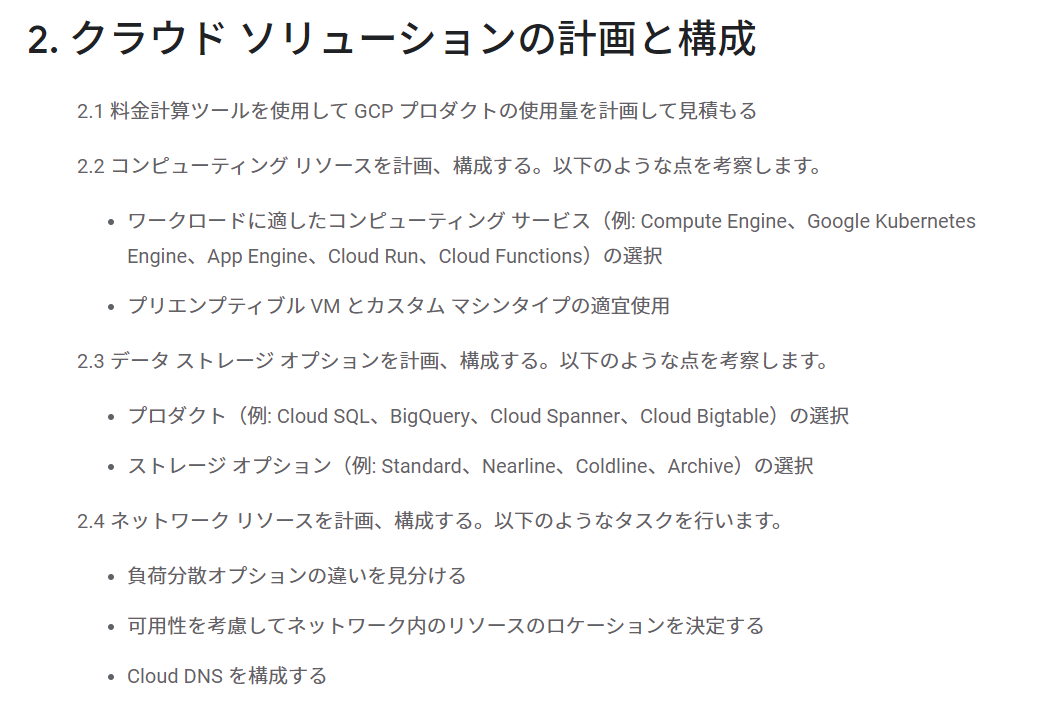
This time, let’s examine Planning and configuring a cloud solution.
2. Planning and Configuring a Cloud Solution
2.1 Plan and estimate GCP product use using the pricing calculator
-
Use the Google Cloud Pricing Calculator to estimate
Reference: Google Cloud Platform Pricing Calculator
2.2 Plan and configure compute resources. Consider the following:
-
Selecting appropriate compute choices for a given workload (e.g., Compute Engine, Google Kubernetes Engine, App Engine, Cloud Run, Cloud Functions)
- There are many hosting options. You need to select the optimal compute service based on use cases like deployment format, need for disk, speed of scaling, etc.
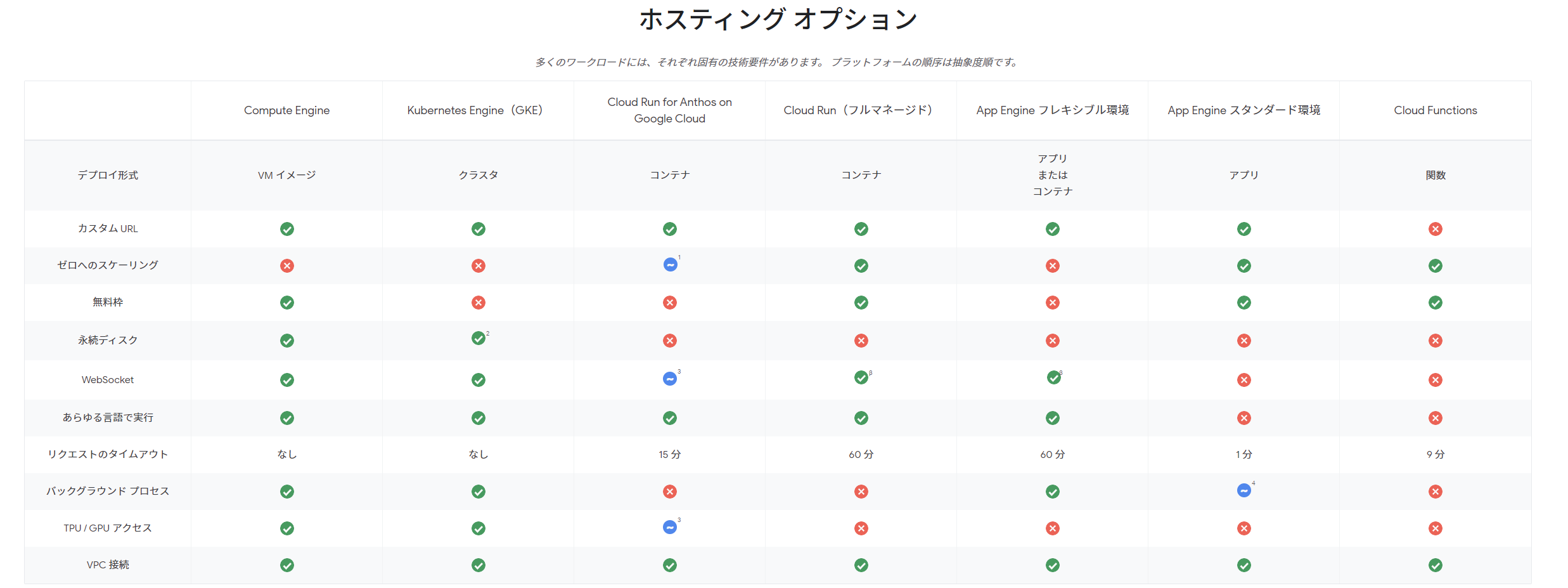
Reference: Application Hosting Options | Hosting Options | Google Cloud
-
Using preemptible VMs and custom machine types as appropriate
-
Preemptible VM instances
Preemptible VMs are instances that you can create and run at a much lower price than normal instances. However, Compute Engine might stop (preempt) these instances if it needs to reclaim those resources for other tasks. Preemptible instances are excess Compute Engine capacity, so their availability varies with usage.
- Similar to AWS Spot Instances
-
Custom machine types
If predefined machine types don’t meet your needs, you can create VM instances with custom virtual hardware settings. Specifically, you can use custom machine types to create VM instances with a customized number of vCPUs and memory capacity.
-
Creating a VM Instance with a Custom Machine Type | Compute Engine Documentation | Google Cloud
-
When creating via gcloud command, use
--custom-cpuand--custom-memoryoptions
gcloud compute instances create example-instance --custom-cpu=4 --custom-memory=5-
It also seems you can add memory to existing instances, which I found to be a convenient feature.
Each machine type has a specific amount of memory set by default according to the machine. For example, when creating a custom N1 VM, you can set up to 6.5 GB of memory per vCPU. For a custom N2 VM, this number is increased to up to 8 GB of memory per vCPU.
-
-
2.3 Plan and configure data storage options. Consider the following:
-
Product selection (e.g., Cloud SQL, BigQuery, Cloud Spanner, Cloud Bigtable)
- Consider whether you need transactions, horizontal scaling, SQL-based analytical queries, a Key-Value data store for large-scale, low-latency workloads, or data storage spanning worldwide regions, and select the appropriate data store accordingly.
-
Choosing storage options (e.g., Standard, Nearline, Coldline, Archive)
Storage Class API & gsutil Name Minimum Storage Duration Typical Monthly Availability Standard Storage STANDARDNone >99.99% for multi-region and dual-region; 99.99% for region Nearline Storage NEARLINE30 days 99.95% for multi-region and dual-region; 99.9% for region Coldline Storage COLDLINE90 days 99.95% for multi-region and dual-region; 99.9% for region Archive Storage ARCHIVE365 days 99.95% for multi-region and dual-region; 99.9% for region
2.4 Plan and configure network resources. Tasks include:
-
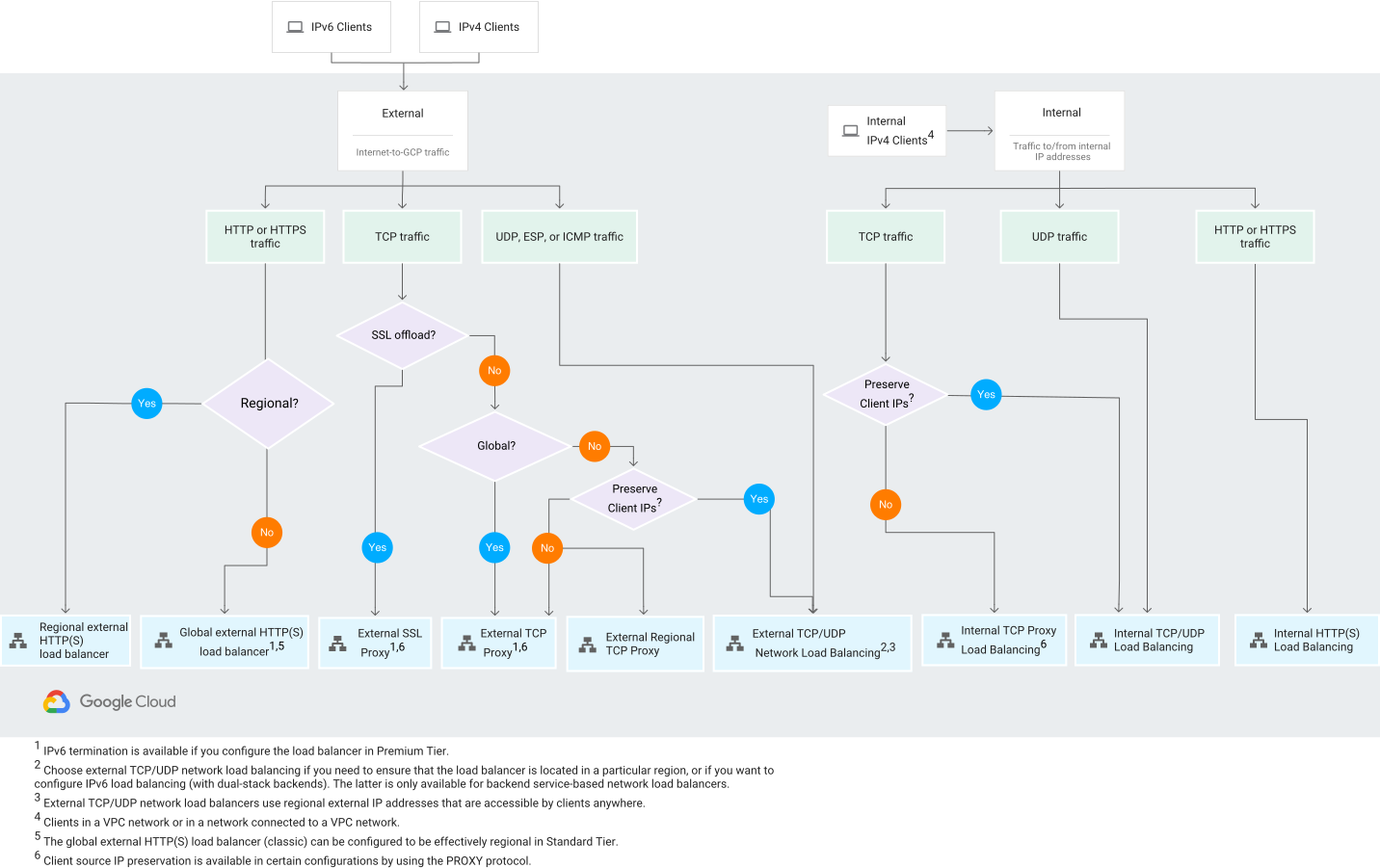
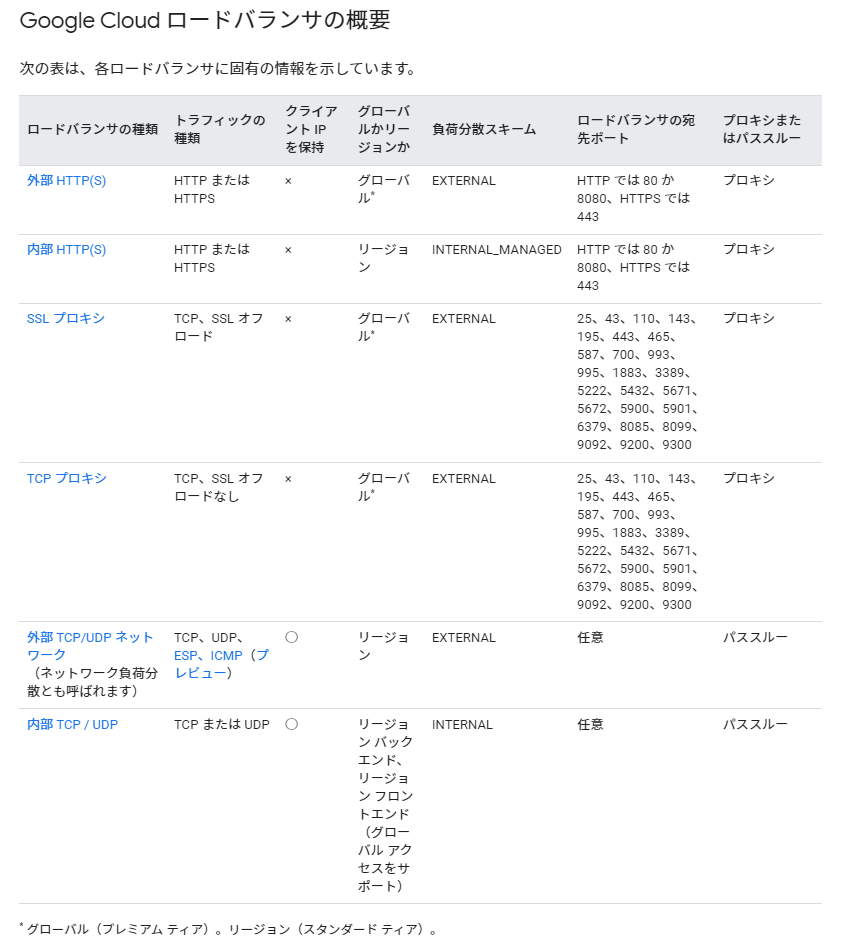
Differentiating load balancing options
Reference: Choosing a Load Balancer | Load Balancing | Google Cloud
-
Identifying resource locations in a network for availability
-
Select locations with attention to factors such as:
- Region-specific restrictions
- User latency by region
- Application latency requirements
- How much latency you can control
- Balance between low latency and simplicity
-
Options include deploying to multiple regions for load balancing, or implementing distributed frontends across multiple regions while keeping the backend in a single region, depending on requirements.
Reference: Best Practices for Selecting Compute Engine Regions | Solutions | Google Cloud
-
-
Configuring Cloud DNS
- Cloud DNS is a high-performance, resilient global Domain Name System (DNS) service
- The GCP terminology may not be immediately intuitive, but it has similar characteristics and functionality to Route53.
Reference: Cloud DNS Overview | Google Cloud