Using only the GOOGLEFINANCE function will return both a Date and Close price.
=GOOGLEFINANCE("CURRENCY:USDJPY", "price", "2019/8/1")
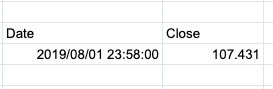
Wrap the function with index(..., 2, 2) to get only the second cell in the second row.
=index(GOOGLEFINANCE("CURRENCY:USDJPY", "price", "2019/8/1"), 2, 2)
Getting a specific company’s stock price. Also use the Index function to retrieve only the desired information.
=index(GOOGLEFINANCE("NASDAQ:AMZN", "price", "2019/8/1"), 2, 2)