Introduction
I implemented two AI/LLM-friendly interfaces for my Hugo blog (GitHub Pages):
- MCP Server - An MCP server that enables article search and browsing from Claude Code (no repository clone required, uses HTTP fetch)
- llms.txt - A standard format for publishing website content for LLMs
What is MCP (Model Context Protocol)?
MCP is a protocol proposed by Anthropic that provides a standard mechanism for AI models to integrate with external data sources and tools. By creating an MCP Server, AI tools like Claude Code can search and browse blog articles.
Implementing the MCP Server
Data Retrieval Method
Originally, the approach was to clone the repository and read local Markdown files directly, but requiring users to clone the repo is inconvenient. I switched to fetching llms-full.txt published on the site via HTTP.
┌──────────────┐     HTTP GET      ┌──────────────────────┐
│  MCP Server  │ ───────────────── │ zatoima.github.io    │
│  (Node.js)   │  /llms-full.txt   │ (GitHub Pages)       │
└──────────────┘                   └──────────────────────┘
       │
       │ stdio
       ▼
┌──────────────┐
│  Claude Code │
└──────────────┘
This eliminates the need to clone the repository. You only need the MCP Server source code and build it. Data is cached for 10 minutes and automatically re-fetched after the cache expires.
Structure
mcp-server/
├── package.json
├── tsconfig.json
├── src/
│   └── index.ts
└── dist/
    └── index.js
The only dependency is @modelcontextprotocol/sdk. Node.js standard fetch is used to retrieve llms-full.txt and parse it into article data.
Available Tools
The MCP Server implements 5 tools:
| Tool Name | Description |
|---|---|
search_posts |
Full-text search of titles, body text, and tags by keyword |
read_post |
Retrieve the full text of an article by slug or partial title |
list_posts |
Get a list of articles (filterable by tag, category, or year) |
list_tags |
List all tags with article counts |
blog_stats |
Blog statistics (article count, posts by year, popular tags) |
Implementation Details
Since llms-full.txt is continuous text of articles separated by ---, it needs to be parsed and converted to structured data.
import { McpServer } from "@modelcontextprotocol/sdk/server/mcp.js";
import { StdioServerTransport } from "@modelcontextprotocol/sdk/server/stdio.js";
import { z } from "zod";

const SITE_URL = "https://zatoima.github.io";

// Fetch and parse data from llms-full.txt
async function getPosts(): Promise<BlogPost[]> {
  const res = await fetch(`${SITE_URL}/llms-full.txt`);
  const text = await res.text();
  return parseLlmsFullTxt(text); // Convert text to article data
}

// Example tool registration: article search
server.tool(
  "search_posts",
  "Search blog articles by keyword",
  {
    query: z.string().describe("Search keyword"),
    limit: z.number().optional().default(10),
  },
  async ({ query, limit }) => {
    const posts = await getPosts();
    const q = query.toLowerCase();
    const results = posts
      .filter(
        (p) =>
          p.title.toLowerCase().includes(q) ||
          p.content.toLowerCase().includes(q) ||
          p.tags.some((t) => t.toLowerCase().includes(q))
      )
      .slice(0, limit);
    // ... return results
  }
);
Setup
No need to clone the entire repository. Just get the MCP Server source code and build it.
# Get MCP Server source and build
git clone --depth 1 --filter=blob:none --sparse https://github.com/zatoima/zatoima.github.io.git
cd zatoima.github.io && git sparse-checkout set mcp-server
cd mcp-server && npm install && npx tsc

# Register with Claude Code
claude mcp add zatoima-blog node $(pwd)/dist/index.js
After registration, you can use it in a Claude Code session like this:
# Search articles
mcp__zatoima-blog__search_posts(query="Aurora")

# Get statistics
mcp__zatoima-blog__blog_stats()
Implementing llms.txt
What is llms.txt?
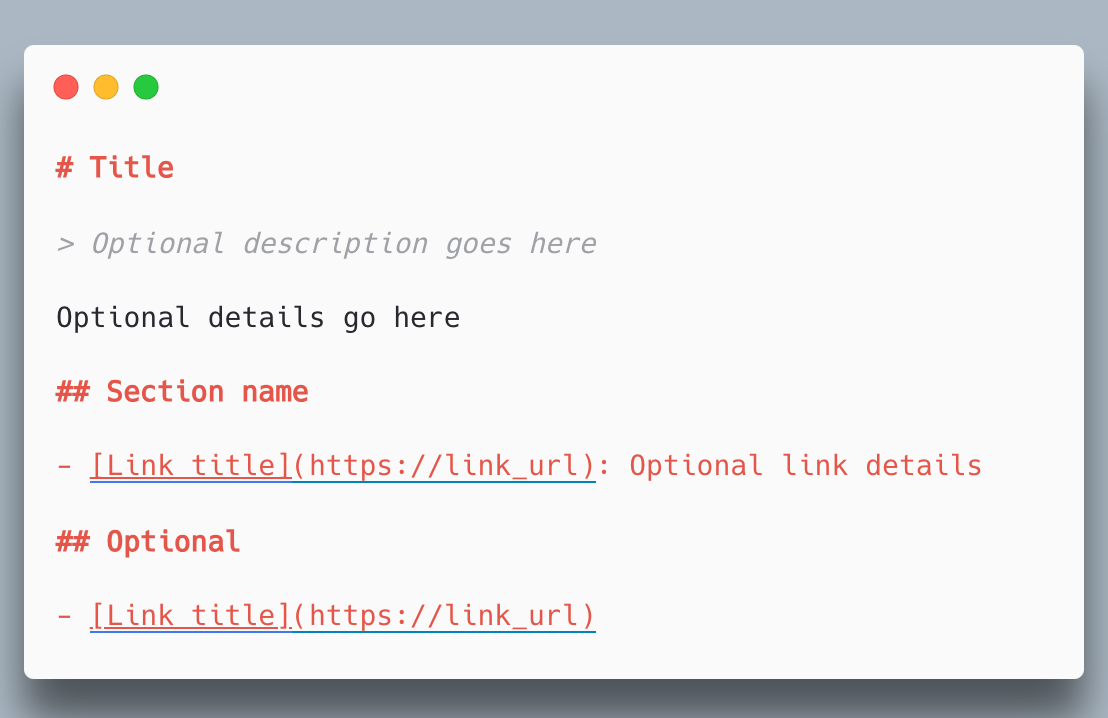
llms.txt is a format for making website content understandable to LLMs. Like the AI version of robots.txt, it provides a summary of the site and article listing in plain text.
/llms.txt- Lightweight version with article titles, URLs, and tags/llms-full.txt- Complete version including the full text of all articles
Generating with Hugo
1. Define custom output formats in hugo.toml
[mediaTypes]
  [mediaTypes."text/llms"]
    suffixes = ["txt"]
  [mediaTypes."text/llms-full"]
    suffixes = ["txt"]

[outputFormats]
  [outputFormats.llms]
    mediaType = "text/llms"
    baseName = "llms"
    isPlainText = true
    notAlternative = true
  [outputFormats.llms-full]
    mediaType = "text/llms-full"
    baseName = "llms-full"
    isPlainText = true
    notAlternative = true

[outputs]
  home = ["HTML", "RSS", "JSON", "llms", "llms-full"]
2. Create template files
layouts/_default/index.llms.txt (lightweight version):
# {{ .Site.Title }}

> {{ .Site.Params.description }}

author: zatoima
url: {{ .Site.BaseURL }}

## Blog Posts

{{- $pages := where .Site.RegularPages "Section" "blog" }}
{{ range $pages }}
- [{{ .Title }}]({{ .Permalink }}) ({{ .Date.Format "2006-01-02" }}){{ with .Params.tags }} [{{ delimit . ", " }}]{{ end }}
{{- end }}
layouts/_default/index.llms-full.txt (complete version):
{{- $pages := where .Site.RegularPages "Section" "blog" }}
{{ range $pages }}
---
### {{ .Title }}
date: {{ .Date.Format "2006-01-02" }}
url: {{ .Permalink }}
{{ .Plain }}
{{ end }}
3. Add links to HTML header
Add the following to the <head> section in layouts/_default/baseof.html:
<link rel="alternate" type="text/plain" href="/llms.txt" title="LLMs.txt" />
<link rel="alternate" type="text/plain" href="/llms-full.txt" title="LLMs-full.txt" />
Also added a link to navigation:
<a href="/llms.txt" title="LLMs.txt - AI/LLM site information">llms.txt</a>
Generated Output
| File | Lines | Content |
|---|---|---|
llms.txt |
414 lines | Article titles, URLs, and tags |
llms-full.txt |
7,448 lines | Complete version with all article body text |
Context Window Impact
The MCP Server fetches llms-full.txt (approximately 1.8MB / estimated 500K tokens) via HTTP on startup and keeps it in memory. However, all this data does not flow into Claude Code’s context window.
The amount of data each tool returns to Claude Code is as follows:
| Tool | Returns | Context Impact |
|---|---|---|
search_posts |
Title list only | Small |
list_posts |
Title list only | Small |
list_tags |
Tag count summary | Small |
blog_stats |
Statistics summary | Small |
read_post |
Full text of one article | Large (varies by article) |
Tools other than read_post return only search/aggregation result summaries, so the impact on the context window is small. The 1.8MB of full article data remains in the MCP Server process memory and does not flow to Claude Code. Only read_post returns the full article text, which can consume significant context for long articles.
Summary
I implemented two different approaches for AI/LLM integration with a static Hugo blog.
| Method | Use Case | Runtime | Clone Required |
|---|---|---|---|
| MCP Server | Article operations from Claude Code | Local (Node.js) | No (HTTP fetch) |
| llms.txt | Publishing LLM-friendly content on the web | GitHub Pages (static files) | No |
By switching the MCP Server to an HTTP fetch approach for llms-full.txt, repository cloning is no longer required. The llms.txt also serves as the data source for the MCP Server, and article data is automatically updated during Hugo builds. Even static sites can be made AI-friendly with the right approach.