Introduction
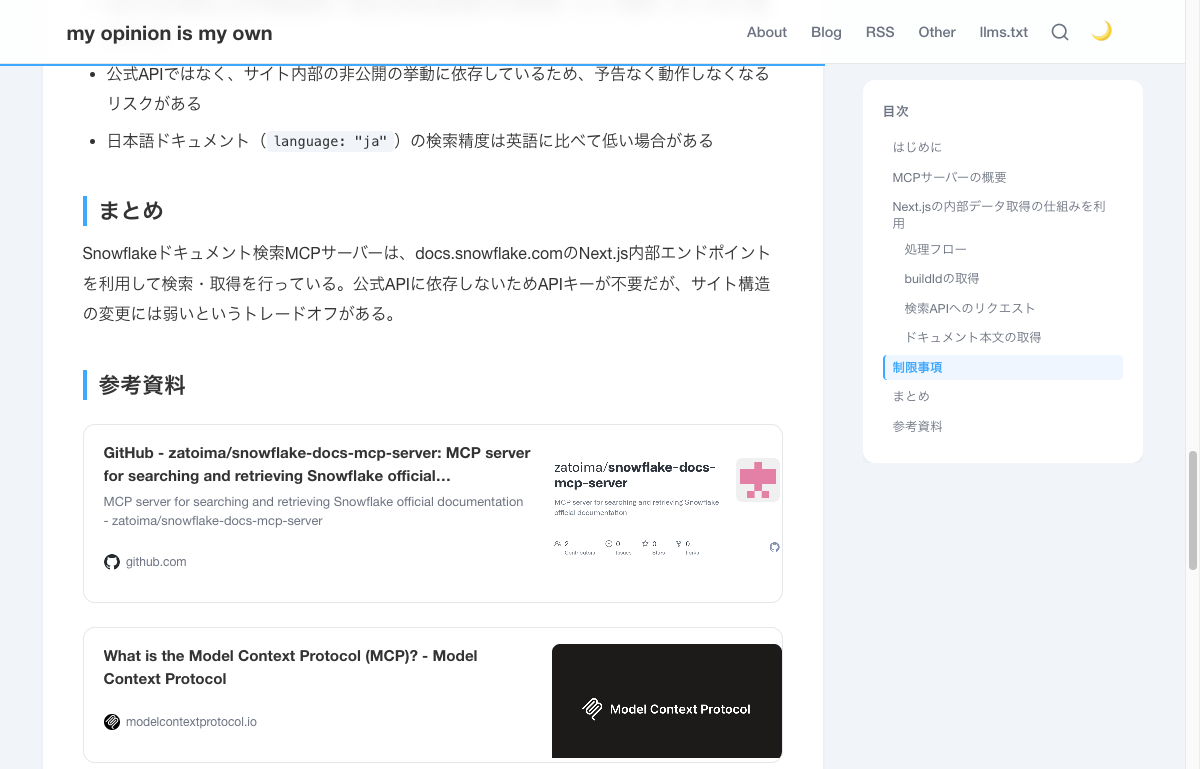
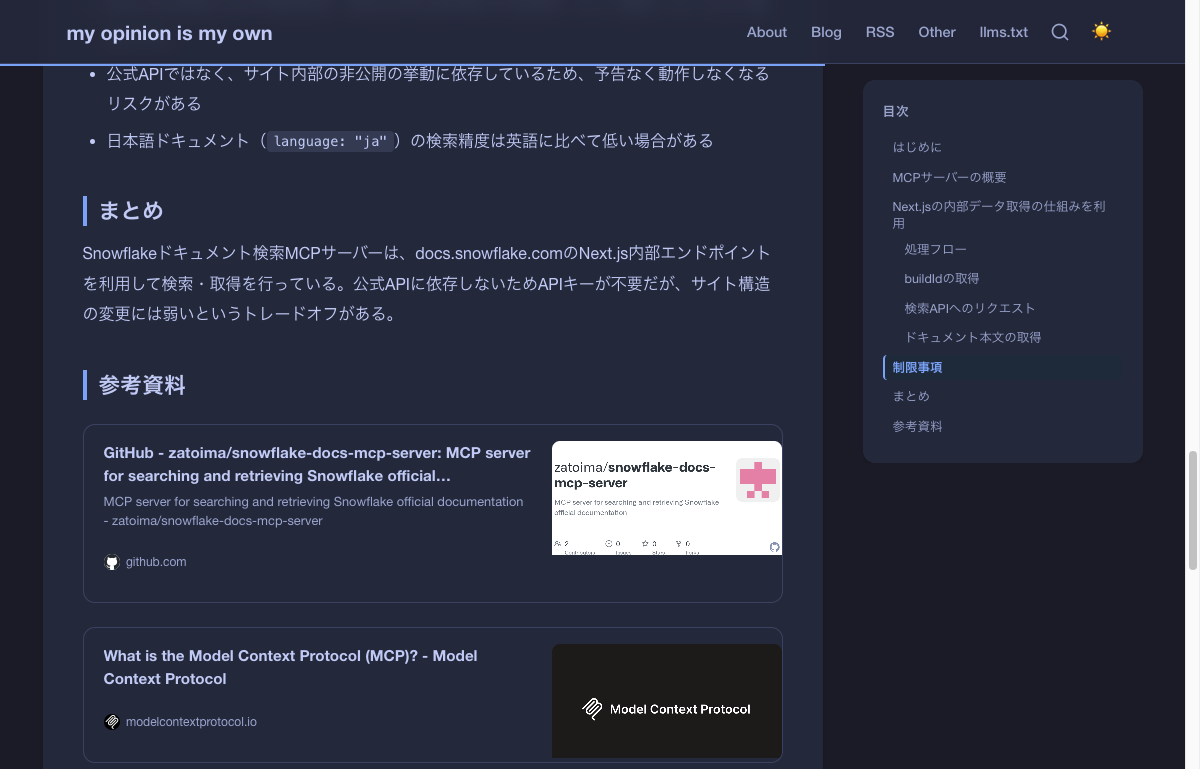
When listing URLs in the reference sections of blog articles, plain bullet-point links look plain and uninviting. To achieve link card displays like those on Zenn or Hatena Blog, I created a linkcard shortcode combining Hugo custom shortcodes with automatic OGP metadata fetching.
Final Result
Light Mode
Dark Mode
Implementation Approach
There are several approaches for implementing link cards:
| Method | Pros | Cons |
|---|---|---|
| JavaScript (client-side) | Dynamic OGP fetching | CORS restrictions, display delay |
| Manual parameter specification | Reliable | Requires manual input each time |
| Build-time OGP fetching (adopted) | Auto-fetch, no JS needed | Slightly longer build time |
I adopted the approach of using Hugo’s resources.GetRemote to fetch the link destination’s HTML at build time and extract OGP metadata. It’s a hybrid type that also supports manual parameter overrides.
Implementation
Adding Hugo Configuration
To issue HTTP requests with resources.GetRemote, you need to add a security setting to hugo.toml.
[security]
  [security.http]
    methods = ['(?i)GET']
    urls = ['.*']
Shortcode Template
Create layouts/shortcodes/linkcard.html.
{{- $url := .Get 0 | default (.Get "url") -}}
{{- $title := .Get "title" | default "" -}}
{{- $description := .Get "description" | default "" -}}
{{- $image := .Get "image" | default "" -}}

{{- if $url -}}
  {{- $domain := replaceRE `^https?://([^/]+).*` "$1" $url -}}
  {{- $favicon := printf "https://www.google.com/s2/favicons?sz=32&domain=%s" $domain -}}

  {{- if not $title -}}
    {{- with resources.GetRemote $url -}}
      {{- with .Err -}}
        {{- warnf "linkcard: failed to fetch %s" $url -}}
      {{- else -}}
        {{- $body := .Content -}}

        {{/* og:title */}}
        {{- range findRE `<meta[^>]*property="og:title"[^>]*>` $body 1 -}}
          {{- $title = replaceRE `.*content="([^"]*)".*` "$1" . -}}
        {{- end -}}

        {{/* og:description */}}
        {{- if not $description -}}
          {{- range findRE `<meta[^>]*property="og:description"[^>]*>` $body 1 -}}
            {{- $description = replaceRE `.*content="([^"]*)".*` "$1" . -}}
          {{- end -}}
        {{- end -}}

        {{/* og:image */}}
        {{- if not $image -}}
          {{- range findRE `<meta[^>]*property="og:image"[^>]*>` $body 1 -}}
            {{- $image = replaceRE `.*content="([^"]*)".*` "$1" . -}}
          {{- end -}}
        {{- end -}}

        {{/* fallback: <title> tag */}}
        {{- if not $title -}}
          {{- range findRE `<title[^>]*>[^<]+</title>` $body 1 -}}
            {{- $title = replaceRE `<title[^>]*>([^<]+)</title>` "$1" . -}}
          {{- end -}}
        {{- end -}}

        {{/* fallback: meta name="description" */}}
        {{- if not $description -}}
          {{- range findRE `<meta[^>]*name="description"[^>]*>` $body 1 -}}
            {{- $description = replaceRE `.*content="([^"]*)".*` "$1" . -}}
          {{- end -}}
        {{- end -}}

        {{/* resolve relative og:image */}}
        {{- if and $image (hasPrefix $image "/") -}}
          {{- $baseURL := replaceRE `^(https?://[^/]+).*` "$1" $url -}}
          {{- $image = printf "%s%s" $baseURL $image -}}
        {{- end -}}
      {{- end -}}
    {{- end -}}
  {{- end -}}

  {{/* final fallback for title */}}
  {{- if not $title -}}
    {{- $title = $url -}}
  {{- end -}}

  <div class="link-card">
    <a href="{{ $url }}" target="_blank" rel="noopener noreferrer">
      <div class="link-card-body">
        <div class="link-card-text">
          <div class="link-card-title">{{ $title }}</div>
          {{- if $description -}}
            <div class="link-card-description">{{ $description }}</div>
          {{- end -}}
          <div class="link-card-meta">
            <img class="link-card-favicon" src="{{ $favicon }}" alt=""
                 loading="lazy" width="16" height="16">
            <span class="link-card-domain">{{ $domain }}</span>
          </div>
        </div>
        {{- if $image -}}
          <div class="link-card-image">
            <img src="{{ $image }}" alt="" loading="lazy">
          </div>
        {{- end -}}
      </div>
    </a>
  </div>
{{- end -}}
The processing flow is as follows:
- Get URL from the first argument or named parameter
url - Fetch HTML using
resources.GetRemote - Extract OGP meta tags (
og:title,og:description,og:image) with regex - Fall back to
<title>tag ormeta name="description"if OGP is absent - Convert relative OG images to absolute paths by prepending base URL
- Fetch favicon using Google Favicons API
CSS
Add link card styles to static/css/zenn.css.
/* --- Link Card --- */
.link-card {
  margin: 1.5rem 0;
}

.link-card a {
  display: block;
  text-decoration: none;
  color: inherit;
  border: 1px solid var(--border-color);
  border-radius: 12px;
  overflow: hidden;
  transition: box-shadow 0.2s ease, border-color 0.2s ease;
  background: var(--bg-card);
}

.link-card a:hover {
  box-shadow: var(--shadow-card-hover);
  border-color: var(--accent);
}

.link-card-body {
  display: flex;
  align-items: stretch;
}

.link-card-text {
  flex: 1;
  min-width: 0;
  padding: 1rem 1.25rem;
  display: flex;
  flex-direction: column;
  justify-content: center;
  gap: 0.35rem;
}

.link-card-title {
  font-size: 0.95rem;
  font-weight: 700;
  line-height: 1.5;
  color: var(--text-primary);
  display: -webkit-box;
  -webkit-line-clamp: 2;
  -webkit-box-orient: vertical;
  overflow: hidden;
}

.link-card-description {
  font-size: 0.8rem;
  color: var(--text-secondary);
  line-height: 1.5;
  display: -webkit-box;
  -webkit-line-clamp: 2;
  -webkit-box-orient: vertical;
  overflow: hidden;
}

.link-card-image {
  width: 230px;
  min-width: 230px;
  max-height: 130px;
  overflow: hidden;
}

.link-card-image img {
  width: 100%;
  height: 100%;
  object-fit: cover;
}
Since existing CSS variables (--border-color, --bg-card, --accent, etc.) are used, dark mode is automatically supported.
To prevent the ↗ icon added to external links from appearing inside cards, add this rule:
.article-content .link-card a[href]::after {
  content: none;
}
Usage
Basic (Auto OGP Fetching)
Just pass the URL and the title, description, and image are automatically fetched at build time.
{{< linkcard "https://github.com/zatoima/snowflake-docs-mcp-server" >}}
Manual Specification
For sites where OGP cannot be fetched or when you want to customize, specify with named parameters.
{{< linkcard url="https://example.com" title="Title" description="Description" image="https://example.com/og.png" >}}
Technical Points
Extracting OGP Meta Tags
The order of property and content attributes in HTML <meta> tags varies by site. Using findRE with <meta[^>]*property="og:title"[^>]*> achieves attribute-order-independent extraction.
Build Cache
Results from resources.GetRemote are saved in Hugo’s resource cache. On subsequent builds, re-fetching doesn’t occur, so the impact on build time is only for the initial build.
Fallback Strategy
Three levels of fallback are implemented for sites without OGP metadata:
og:title → <title> tag → URL string
og:description → meta name="description" → (not displayed)
og:image → (not displayed)
Summary
By combining Hugo’s resources.GetRemote with regex-based OGP metadata extraction, I implemented a shortcode that automatically generates link cards at build time. Since no JavaScript is used, display is fast and there are no CORS restrictions. Dark mode is also supported by leveraging existing CSS variables.