Since there are no study books or prep sites for the SnowPro Core certification, I decided to follow the exam guide and refer to the manual and online resources, along with hands-on verification. Here are my notes.
SnowPro Core Certification Exam Guide
- Snowflake Certifications | Snowflake https://www.snowflake.com/certifications/
1.0 Domain: Account and Security
1.1 Describe how to manage Snowflake accounts.
-
Account usage
-
Information Schema
- INFORMATION_SCHEMA
- A set of system-defined views and table functions that provide extensive metadata about objects created in the account
- Snowflake Information Schema — Snowflake Documentation
- INFORMATION_SCHEMA
1.2 Describe an overview of Snowflake’s security principles.
-
Multi-Factor Authentication (MFA)
- Configure MFA with Duo Mobile
- Authentication required for console, SnowSQL (CLI client) , JDBC driver, etc.
- Multi-Factor Authentication (MFA) — Snowflake Documentation
- Configure MFA with Duo Mobile
-
Data Encryption
-
End-to-end encryption
- AES256 encryption
- End-to-end encryption (E2EE) is a method of protecting data that encrypts data at rest or data in transit to/from Snowflake
- AES256 encryption
-
Hierarchical key model using CloudHSM
-
Automatic rotation
- All keys managed by Snowflake are automatically rotated by Snowflake after 30 days or more.
-
Tri-Secret Secure
- A feature that creates a composite master key to protect Snowflake data by combining a Snowflake-managed key and a customer-managed key on the cloud provider platform hosting the Snowflake account
- Requires contacting support to use
- Requires Business Critical edition or higher
-
Studying Snowflake Data Protection (Encryption) | DevelopersIO
-
-
Network Security and Policies
- Continuous Data Protection
- Continuous Data Protection — Snowflake Documentation
- Network Policies
- Network policies to allow or restrict access
- IP allow/block lists
- Network Policies
- Continuous Data Protection — Snowflake Documentation
- Continuous Data Protection
-
Access Control
-
Snowflake Access Control — Snowflake Documentation
-
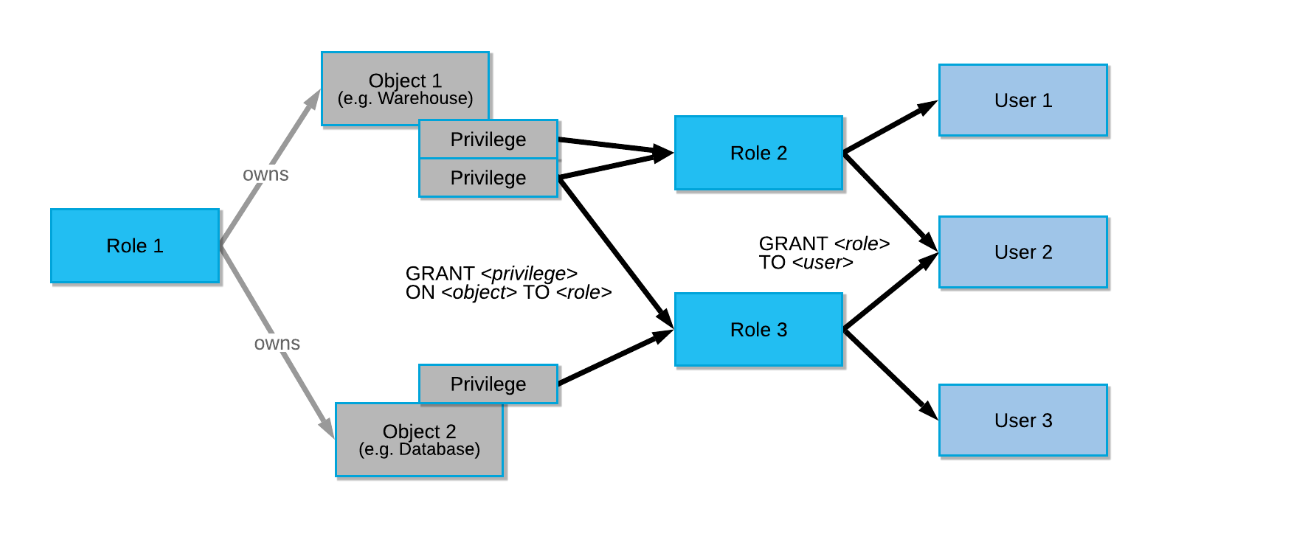
Discretionary Access Control (DAC): Each object has an owner who can grant access to that object.
-
Role-Based Access Control (RBAC): Access privileges are assigned to roles, and roles are assigned to users.
-
-
System-Defined Roles
-
Role Name Function Description SYSADMIN A role with privileges to create warehouses and databases (and other objects) in an account ORGADMIN A role to manage operations at the organization level Can create accounts in the organization. Can view all accounts in the organization (using SHOW ORGANIZATION ACCOUNTS) and all regions enabled for the organization (using SHOW REGIONS). Can view usage information for the entire organization. ACCOUNTADMIN A role that encapsulates the SYSADMIN and SECURITYADMIN system-defined roles The top-level role in the system that should only be granted to a limited/controlled number of users in an account. Has privileges to create warehouses and databases (and other objects) in an account. Can manage object grants globally and create, monitor, and manage users and roles. SECURITYADMIN A role that can manage object grants globally and create, monitor, and manage users and roles Has MANAGE GRANTS security privilege, allowing modification of any grant including revoking. Inherits the privileges of the USERADMIN role through the system role hierarchy. USERADMIN A role dedicated solely to user and role management Has CREATE USER and CREATE ROLE security privileges. Can create users and roles in the account. PUBLIC A pseudo-role automatically granted to every user and every role in the account Used when no explicit access control is required and all users are considered equal.
-
-
-
-
Federated Authentication
-
Single Sign-On (SSO)
1.3 Define the entities and roles used in Snowflake.
-
Describe how to grant and revoke privileges
CREATE ROLE test_role;
GRANT USAGE ON DATABASE citibike TO ROLE test_role;
GRANT USAGE ON DATABASE weather TO ROLE test_role;

revoke role aaaa from role vvvv;
Describe role hierarchy and privilege inheritance
1.4 Describe security features related to each Snowflake edition.
- Data Masking
1.5 Describe an overview of Snowflake’s data governance features
-
Data Masking
- Same as above
-
Account Usage Views
-
External Tokenization
- A column-based security feature that tokenizes column values
- Requires a third-party product function
- External Tokenization — Snowflake Documentation
- A column-based security feature that tokenizes column values
2.0 Domain: Virtual Warehouses
2.1 Describe an overview of computing principles.
-
Credit usage and billing
-
Concurrency
- Warehouse Overview — Snowflake Documentation
- Determined by the size and complexity of each query
- If the warehouse does not have enough resources to process a query, the query is queued and pending resources become available when other running queries complete
- To increase concurrency, use multi-cluster warehouses (requires Enterprise Edition or higher)
- If the warehouse does not have enough resources to process a query, the query is queued and pending resources become available when other running queries complete
-
Caching
-
# Cache Name Cache Target Users Who Can Use It Storage Layer Validity Period 1 Result Cache Query results All users with the same role that executed the query Snowflake 24 hours 2 Metadata Cache Information about tables All users Snowflake Always 3 Data Cache File headers and column data from query results Users who ran on the same virtual warehouse Warehouse (SSD) While warehouse is running Notes
Result Cache
https://docs.snowflake.com/en/user-guide/querying-persisted-results.html#retrieval-optimization
Typically, query results are reused when all of the following conditions are met:
- The new query is syntactically identical to the previously-executed query.
- The query does not include functions that must be evaluated at execution time (e.g., CURRENT_TIMESTAMP() and UUID_STRING()). The CURRENT_DATE() function is an exception to this rule.
- The query does not include User-Defined Functions (UDFs) or External Functions.
- The table data that contributed to the query result has not changed.
- The persisted result for the previous query is still available.
- The role that has access to the cached result has the necessary privileges.
- Configuration options that affect how results are generated have not changed.
- The micro-partitions for the tables have not changed due to other data manipulation operations (e.g., reclustering or consolidation).
Even if all these conditions are met, Snowflake does not guarantee that query results will be reused.
-
How to Set Parameters to Not Use Cache When Running Queries in Snowflake - Qiita
-
2.2 Describe virtual warehouse best practices.
-
Scale up and scale out
- Type changes and multi-cluster
-
Virtual warehouse types
- Like T-shirt sizes
-
Management/Monitoring
3.0 Domain: Data Movement
3.1 Describe an overview of the different commands used to load data, and when they should be used.
-
COPY
- COPY INTO — Snowflake Documentation
- For bulk data loading
-
INSERT
- INSERT INTO xxxx SELECT ~~?
-
PUT
-
GET
- Used when exchanging data with internal stages
-
VALIDATE
-
A function that validates files loaded in past executions of COPY INTO and returns all errors that occurred during loading, not just the first error
-
select * from table(validate(t1, job_id => '_last'));
3.2 Define bulk versus continuous data loading methods.
- COPY
- For bulk data loading
- Snowpipe
3.3 Define best practices to consider when loading data.
- File size
- Folders
3.4 Describe how to unload data from Snowflake to local or cloud storage.
- Define supported file formats for unloading data from Snowflake
-
Preparing to Unload Data — Snowflake Documentation
- JSON, Parquet
- Delimited (CSV, TSV, etc.)
- Always encoded in UTF-8
-
Define best practices to consider when unloading data
-
3.5 Describe how to work with and load semi-structured data.
-
Supported file formats
- JSON, Avro, ORC, Parquet, XML
- Overview of Semi-Structured Data — Snowflake Documentation
-
VARIANT column
-
Flattening nested structures
-
select
  value:name::string as "Customer Name",
  value:address::string as "Address"
  from
    car_sales
  , lateral flatten(input => src:customer);
select src:customer[0].name, src:vehicle[0].price from car_sales order by 1;
-
4.0 Domain: Performance Management
4.1 Describe best practices for Snowflake performance management in storage.
-
Clustering
- Clustering Keys and Clustered Tables — Snowflake Documentation
- Snowflake can cluster automatically, but users can also specify clustering keys for specific columns.
- Not recommended for all tables. Additional costs are required.
- When the fastest possible response time is needed regardless of cost.
- When the credits required to cluster and maintain the table are offset by improved query performance.
-
Materialized Views
- Materialized Views with automatic result maintenance
- Enterprise Edition feature or higher
-
Search Optimization
-
Enterprise Edition feature or higher
-
Feature to improve performance of selective search queries on large tables
- Table size is 100GB or more
- Is a non-clustered table
- Frequently searched on columns other than the main cluster key
- Queries run for tens of seconds
- At least one column accessed in query filters has 100,000-200,000 or more distinct values
- Uses equality predicates
<column> = <constant>orINpredicates
-
Using the Search Optimization Service — Snowflake Documentation
-
Trying Snowflake’s Search Optimization Service | DevelopersIO
-
4.2 Describe best practices for Snowflake performance management in virtual warehouses.
-
Query performance and analysis
-
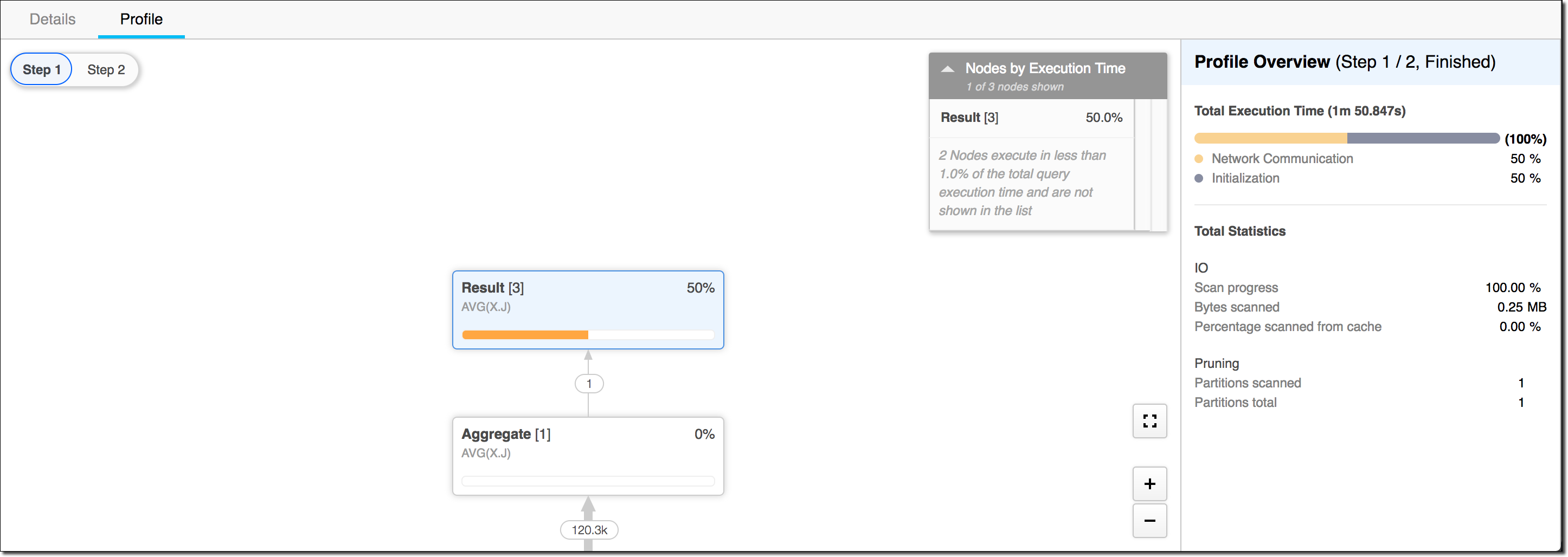
Query Profile
-
Query History
-
Monitoring Queries Using the History Page — Snowflake Documentation
- Shows details of all queries executed in the last 14 days from the console
-
QUERY_HISTORY View — Snowflake Documentation
- Can query Snowflake query history within the last 365 days by various dimensions (time range, session, user, warehouse, etc.)
-
-
SQL Optimization
-
Caching
- Metadata cache
- Query result cache
- Stored for 24 hours. Valid as long as data hasn’t changed.
- Disabling query result cache:
-
ALTER SESSION SET USE_CACHED_RESULT = FALSE;
-
5.0 Domain: Snowflake Overview and Architecture
5.1 Describe an overview of the key components of Snowflake’s cloud data platform.
- Data types
- Optimizer
- Continuous Data Protection
- Cloning
- Types of caching
- Web interface (UI)
- Data Cloud/Data Sharing/Data Marketplace/Data Exchange
5.2 Describe an overview of Snowflake’s data sharing capabilities.
- Account types
- Data Marketplace and Data Exchange
- Access control options
- Sharing
5.3 Describe how Snowflake differs from traditional warehouse solutions.
- Elastic storage
- Elastic compute
- Account management
5.4 Describe an overview of the various editions available, and the features associated with each edition.
- Pricing
- Features
5.5 Identify Snowflake’s partner ecosystem.
- Cloud partners
- Connectors
5.6 Describe and define the purpose of Snowflake’s three distinct layers.
- Storage layer
- Compute layer
- Cloud services layer
5.7 Describe an overview of Snowflake’s catalog and objects.
- Databases
- Schemas
- Table types
- View types
- Data types
- External functions
6.0 Domain: Storage and Protection
6.1 Describe an overview of Snowflake storage concepts.
- Micro-partitions
- Metadata types
- Clustering
- Data storage
- Stage types
- File formats
- Storage monitoring
6.2 Describe an overview of continuous data protection by Snowflake.
-
Time Travel
-
Fail Safe
-
Data Encryption
-
Cloning
Update
(8/27 Update) Somehow managed to pass!