はじめに
LLM関連の論文は毎日大量に公開されており、手動で追いかけるのは現実的ではない。そこで、論文の収集・要約・ブログ公開・Slack通知までを自動化するパイプラインをClaude Codeを使って構築した。
本記事では、このパイプラインのアーキテクチャと各コンポーネントの実装について記録する。
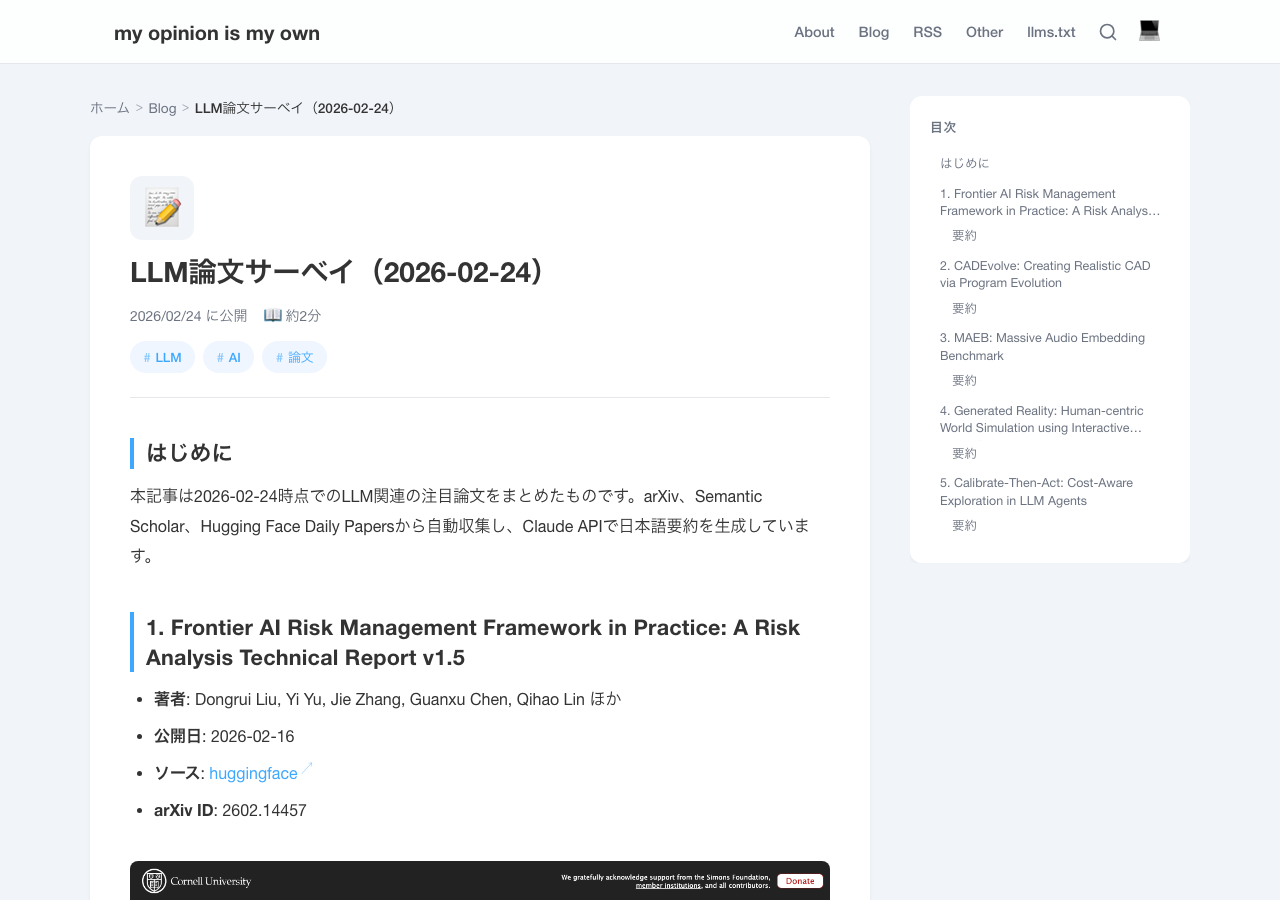
生成される記事のイメージ
以下は実際にパイプラインが生成した記事のスクリーンショットである。
アーキテクチャ概要
パイプライン全体の処理フローは以下の通りである。
[launchd: 毎日7:00]
       |
       v
[run_pipeline.sh]
       |
       v
[pipeline.py]
  |
  |-- 1. 状態ファイル読み込み (state.py)
  |-- 2. 論文収集 (fetchers.py)
  |       |-- arXiv API
  |       |-- Semantic Scholar API
  |       |-- HuggingFace Daily Papers API
  |       |-- 重複排除 + 人気度ソート
  |-- 3. 処理済み論文の除外
  |-- 4. 日本語要約生成 (summarizer.py) ... claude -p
  |-- 5. スクリーンショット取得 (screenshot.py) ... Playwright
  |-- 6. Hugo記事生成 (publisher.py)
  |-- 7. 状態ファイル保存
  |-- 8. git commit → hugo build → git push
  |-- 9. Slack通知 (notifier.py) ... claude -p + Slack MCP
ディレクトリ構成
scripts/llm_papers/
├── config.py               # 設定値の一元管理
├── fetchers.py             # 3ソースからの論文取得
├── summarizer.py           # Claude CLIによる要約生成
├── screenshot.py           # Playwrightによるスクリーンショット
├── publisher.py            # Hugo記事の生成
├── notifier.py             # Slack通知
├── state.py                # 冪等性の状態管理
├── pipeline.py             # メインオーケストレーター
├── run_pipeline.sh         # launchdから呼ばれるシェルラッパー
├── requirements.txt        # Python依存パッケージ
├── processed_papers.json   # 処理済み論文のID記録
├── pipeline.log            # アプリケーションログ
└── venv/                   # Python仮想環境
論文収集(fetchers.py)
3つのソースからLLM関連論文を収集し、統一的なPaperデータクラスに変換する。
データモデル
@dataclass
class Paper:
    paper_id: str
    title: str
    authors: list[str]
    abstract: str
    published: str          # ISO date string
    url: str
    source: str             # "arxiv", "semantic_scholar", "huggingface"
    arxiv_id: str | None = None
    doi: str | None = None
    categories: list[str] = field(default_factory=list)
    popularity_score: float = 0.0  # 人気度スコア
各ソースの取得戦略
| ソース | API | 対象期間 | 人気度指標 | 最大取得数 |
|---|---|---|---|---|
| arXiv | arxiv Python library | 最新50件 | S2 Batch APIで補完 | 50 |
| Semantic Scholar | Graph API v1 | 過去3日 | citationCount | 20/keyword |
| HuggingFace | Daily Papers API | 当日分 | upvotes | 全件 |
arXiv
cs.CL(計算言語学)とcs.AI(人工知能)カテゴリから、LLM関連キーワードでフィルタリングする。
cat_query = " OR ".join(f"cat:{cat}" for cat in ["cs.CL", "cs.AI"])
keyword_query = " OR ".join(f'abs:"{kw}"' for kw in ARXIV_KEYWORDS[:5])
query = f"({cat_query}) AND ({keyword_query})"
arXiv APIはレート制限が厳しいため、delay_seconds=5.0、num_retries=5を設定している。
Semantic Scholar
Graph API v1の/paper/searchエンドポイントを使い、publicationDateOrYearパラメータで直近3日間に絞り込む。citationCountフィールドをそのまま人気度スコアとして利用する。
HuggingFace Daily Papers
https://huggingface.co/api/daily_papersから当日のキュレーション済み論文を取得する。HuggingFaceはLLM以外の論文も含まれるため、キーワードフィルタを適用している。
LLM_FILTER_KEYWORDS = [
    "language model", "LLM", "transformer", "GPT", "BERT",
    "instruction tuning", "RLHF", "prompt", "chain of thought",
    "retrieval augmented", "RAG", "fine-tuning", "alignment",
    "reasoning", "tokeniz", "attention mechanism", ...
]

def _is_llm_related(title: str, abstract: str) -> bool:
    text = (title + " " + abstract).lower()
    return any(kw.lower() in text for kw in LLM_FILTER_KEYWORDS)
upvotesフィールドを人気度スコアとして利用する。
人気度ベースのソート
arXivから取得した論文は人気度情報を持たないため、Semantic Scholar Batch APIで被引用数を補完する。
def _enrich_popularity_from_s2(papers: list[Paper]) -> None:
    papers_to_enrich = [p for p in papers if p.popularity_score < 0.1 and p.arxiv_id]
    arxiv_ids = [f"ArXiv:{p.arxiv_id}" for p in papers_to_enrich]

    resp = requests.post(
        "https://api.semanticscholar.org/graph/v1/paper/batch",
        json={"ids": arxiv_ids[:500]},
        params={"fields": "citationCount,externalIds"},
    )
    # 結果をpopularity_scoreに反映
最終的に(popularity_score, published)のタプルで降順ソートし、人気の高い新しい論文を優先的に選出する。
重複排除
複数ソースからの重複は、paper_idベースの排除(arXivソースを優先)と、正規化タイトルベースの排除の2段階で処理する。
日本語要約生成(summarizer.py)
Anthropic SDKではなく、Claude Code CLI(claude -p)を直接呼び出して要約を生成する。これによりANTHROPIC_API_KEYの管理が不要になる。
def generate_summary(paper: Paper) -> str:
    prompt = (
        f"以下の論文のAbstractを日本語で要約してください。要約は3〜5文程度で、"
        f"技術的な内容を正確に伝えてください。要約のテキストのみを出力し、"
        f"前置きや説明は不要です。\n\n"
        f"タイトル: {paper.title}\n"
        f"Abstract:\n{paper.abstract}"
    )

    result = subprocess.run(
        ["claude", "-p", prompt],
        capture_output=True, text=True, timeout=120,
        env=_get_claude_env(),
    )
CLAUDECODE環境変数の除去
パイプラインがClaude Codeセッション内から実行される場合、ネストされたClaude CLIの起動が拒否される。これを回避するため、CLAUDECODE環境変数を除去してからsubprocessを実行する。
def _get_claude_env() -> dict:
    env = os.environ.copy()
    env.pop("CLAUDECODE", None)
    return env
Slack通知(notifier.py)
処理完了後、Slackの#notifyチャンネルに論文サマリーを投稿する。Slack APIを直接叩くのではなく、Claude Code CLI経由でSlack MCPツールを呼び出す方式を採用した。
def notify_slack(papers, summaries, date) -> bool:
    message = _format_slack_message(papers, summaries, date, blog_url)

    prompt = (
        f"以下のメッセージをSlackのnotifyチャンネル(ID: {SLACK_CHANNEL_ID})に"
        f"mcp__slack__slack_post_messageツールを使って投稿してください。"
        f"メッセージの内容をそのまま投稿し、それ以外の出力は不要です。\n\n"
        f"メッセージ:\n{message}"
    )

    result = subprocess.run(
        ["claude", "-p", "--allowedTools", "mcp__slack__slack_post_message"],
        input=prompt,
        capture_output=True, text=True, timeout=60,
        env=_get_claude_env(),
    )
--allowedToolsでSlack投稿ツールのみを許可し、意図しないツール呼び出しを防いでいる。
冪等性の担保(state.py)
processed_papers.jsonにて処理済み論文のIDを管理し、同一論文の重複処理を防ぐ。
{
  "processed_ids": {
    "arxiv:2602.10693": {
      "title": "VESPO: Variational Sequence-Level Soft Policy Optimization...",
      "processed_at": "2026-02-23T21:52:36.202101"
    },
    "arxiv:2602.08354": {
      "title": "Does Your Reasoning Model Implicitly Know When to Stop Thinking?",
      "processed_at": "2026-02-23T21:52:36.202114"
    }
  },
  "last_run": "2026-02-24T09:16:33.952783"
}
パイプラインの各実行で、取得した論文リストから処理済みIDを除外した上で、上位N件(デフォルト5件)を選出する。
new_papers = [p for p in all_papers if not is_processed(state, p.paper_id)]
featured_papers = new_papers[:TOP_N_PAPERS]
Hugo記事生成(publisher.py)
選出された論文をYAMLフロントマター付きのMarkdownとして出力する。各論文について、日本語要約と折りたたみ式の原文Abstractを含む。
生成される記事の構造:
---
title: "LLM論文サーベイ(2026-02-24)"
tags: ["LLM", "AI", "論文"]
url: llm-papers-2026-02-24
date: 2026-02-24
---

## 1. 論文タイトル
- **著者**: ...
- **ソース**: [huggingface](https://arxiv.org/abs/...)

### 要約
(Claude CLIが生成した日本語要約)

{{< details "原文Abstract" >}}
(英語の原文)
{{< /details >}}
自動デプロイ
記事生成後、以下のgit操作を自動実行する。
def git_commit_and_push(post_dir: Path) -> None:
    subprocess.run(["git", "add", str(post_dir)], cwd=PROJECT_ROOT)
    subprocess.run(["git", "commit", "-m", f"Add LLM papers survey ({date})"], cwd=PROJECT_ROOT)
    subprocess.run(["hugo", "--config", "hugo.toml", "-d", "docs"], cwd=PROJECT_ROOT)
    subprocess.run(["git", "add", "docs/"], cwd=PROJECT_ROOT)
    subprocess.run(["git", "commit", "-m", "Build website"], cwd=PROJECT_ROOT)
    subprocess.run(["git", "push", "origin", "main"], cwd=PROJECT_ROOT)
定期実行(launchd)
macOSのlaunchdを使い、毎日朝7時に自動実行される。
<!-- ~/Library/LaunchAgents/com.zatoima.llm-papers-pipeline.plist -->
<dict>
    <key>Label</key>
    <string>com.zatoima.llm-papers-pipeline</string>
    <key>ProgramArguments</key>
    <array>
        <string>/bin/bash</string>
        <string>/.../scripts/llm_papers/run_pipeline.sh</string>
    </array>
    <key>StartCalendarInterval</key>
    <dict>
        <key>Hour</key>
        <integer>7</integer>
        <key>Minute</key>
        <integer>0</integer>
    </dict>
</dict>
シェルラッパー(run_pipeline.sh)では、venvのactivateではなくvenvのPythonバイナリを直接指定する。launchd環境ではsource activateが失敗するケースがあるためである。
# activate ではなく直接パス指定(launchdとの互換性のため)
./venv/bin/python3 pipeline.py --verbose
エラーハンドリング
各APIコールには指数バックオフ付きのリトライ機構を組み込んでいる。
def _retry_request(func, *args, **kwargs):
    for attempt in range(MAX_RETRIES):
        try:
            return func(*args, **kwargs)
        except Exception as e:
            if attempt < MAX_RETRIES - 1:
                wait = RETRY_DELAY * (2 ** attempt)  # 2s, 4s, 8s
                time.sleep(wait)
            else:
                raise
一部ソースの取得に失敗しても他のソースで処理を継続するため、パイプライン全体が停止することはない。要約生成の失敗時はAbstractの先頭300文字を代替テキストとして使用する。
CLIオプション
開発・デバッグ用に以下のオプションを用意した。
| オプション | 説明 |
|---|---|
--verbose |
DEBUGレベルのログ出力 |
--skip-screenshots |
スクリーンショット取得をスキップ |
--skip-push |
git commit/pushをスキップ |
--dry-run |
処理対象の論文を表示するのみ |
--max-papers N |
取得する論文数を指定 |
ソースコード
本パイプラインのソースコードはGitHubで公開している。
https://github.com/zatoima/llm-papers-pipeline
まとめ
本パイプラインの特徴を整理する。
- 3ソース横断収集: arXiv、Semantic Scholar、HuggingFace Daily Papersからの自動収集
- 人気度ベース選出: upvotes・被引用数による優先度付けで、注目論文を自動的にピックアップ
- Claude Code CLI活用: APIキー管理不要の要約生成とSlack MCP経由の通知
- 冪等性:
processed_papers.jsonによる状態管理で重複処理を防止 - 自動デプロイ: Hugo build → GitHub Pages公開 → Slack通知までを一気通貫で実行
- 定期実行: macOS launchdによる毎日7時の無人運用