I tried loading TPC-DS data, which is also used for Redshift benchmarks, and executing analytical queries. It provides a fixed volume of data (from 100GB to 1PB), making it easy to run analytical queries against large datasets.
For information on the TPC-DS benchmark, see here . It appears to model the decision support functions of a retail product supplier.
Resources
Scripts are organized in amazon-redshift-utils.
amazon-redshift-utils/src/CloudDataWarehouseBenchmark/Cloud-DWB-Derived-from-TPCDS at master - awslabs/amazon-redshift-utils - GitHub https://github.com/awslabs/amazon-redshift-utils/tree/master/src/CloudDataWarehouseBenchmark/Cloud-DWB-Derived-from-TPCDS
The data loading scripts are in the US-EAST-1 region, so be aware of potential transfer overhead if running Redshift in the Tokyo region.
https://s3.console.aws.amazon.com/s3/buckets/redshift-downloads?prefix=TPC-DS%2F®ion=us-east-1
Procedure Overview
-
Edit ddl.sql and replace
<USER_ACCESS_KEY_ID>and<USER_SECRET_ACCESS_KEY>with valid S3 credentials. -
Create a new database to load the dataset.
-
Connect to the created database and execute ddl.sql.
Note: Depending on the data scale and data warehouse size, this may take several hours.
-
Execute query_0.sql etc. to measure execution time.
Procedure
-
Edit ddl.sql
Replace the following sections with your credentials. The target ddl.sql is here. Clone locally with git clone and edit.
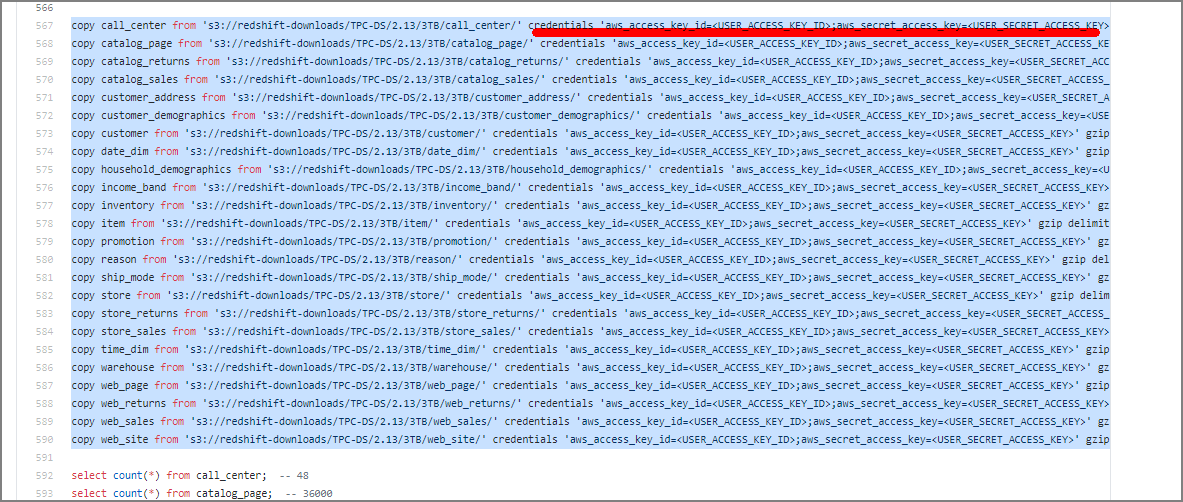
You can also rewrite to use an IAM role:
copy call_center from 's3://redshift-downloads/TPC-DS/2.13/3TB/call_center/' iam_role 'arn:aws:iam::xxxxxxxxxxxxxxx:role/myRedshiftRole' gzip delimiter '|' EMPTYASNULL region 'us-east-1';
copy catalog_page from 's3://redshift-downloads/TPC-DS/2.13/3TB/catalog_page/' iam_role 'arn:aws:iam::xxxxxxxxxxxxxxx:role/myRedshiftRole' gzip delimiter '|' EMPTYASNULL region 'us-east-1';
copy catalog_returns from 's3://redshift-downloads/TPC-DS/2.13/3TB/catalog_returns/' iam_role 'arn:aws:iam::xxxxxxxxxxxxxxx:role/myRedshiftRole' gzip delimiter '|' EMPTYASNULL region 'us-east-1';
~omitted~
2. Create the Database
drop database tpcds_3tb;
CREATE DATABASE tpcds_3tb;
3. Execute Load Against the Created Database
psql -h redshift-cluster.xxxxx.ap-northeast-1.redshift.amazonaws.com -U awsuser -d tpcds_3tb -p 5439 -f /home/ec2-user/amazon-redshift-utils-master/src/CloudDataWarehouseBenchmark/Cloud-DWB-Derived-from-TPCDS/3TB/ddl.sql
This executes table creation, data loading, and row count verification. (Note: this takes time)
4. Execute Queries
Queries from query_0.sql to query_10.sql are available, execute as appropriate. When benchmarking, don’t forget to disable the result cache.
psql -h redshift-cluster.xxxxx.ap-northeast-1.redshift.amazonaws.com -U awsuser -d tpcds_3tb -p 5439 -f /home/ec2-user/amazon-redshift-utils-master/src/CloudDataWarehouseBenchmark/Cloud-DWB-Derived-from-TPCDS/3TB/queries/query_0.sql