Introduction
The goal is as the title states. When doing validation work, I often want a schema that has not only my own test tables, but also constraints, triggers, views, and production-like data. Oracle sample schema installation can be specified at DBCA execution time, but there are many cases where I didn’t check the box.
Here I document how to create sample schemas after the fact when sample schema installation was not configured at DBCA execution time. I ran this on 12.1.0.2, but since creation scripts are available for 12cR1 and later, the same steps should work.
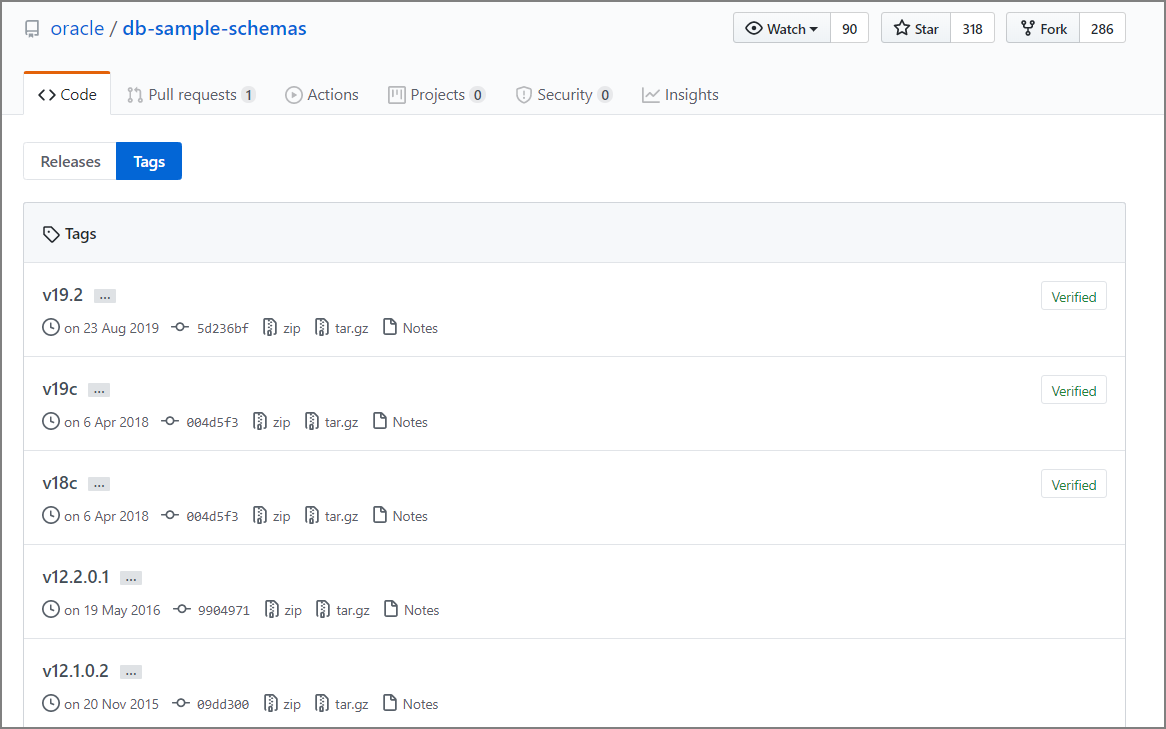
Scripts for 12.1.0.2 are here:
Release Oracle Database 12.1.0.2 Sample Schemas · oracle/db-sample-schemas · GitHub https://github.com/oracle/db-sample-schemas/releases/tag/v12.1.0.2
The procedure is here:
GitHub-oracle / db-sample-schemas: Oracle Database Sample Schemas https://github.com/oracle/db-sample-schemas
Note that as of today, there are sample schema creation scripts for 12cR1 through 19c.
Preparation
Download the source code from GitHub and place it in the specified directory.
Scripts for 12.1.0.2 are here:
Release Oracle Database 12.1.0.2 Sample Schemas · oracle/db-sample-schemas · GitHub https://github.com/oracle/db-sample-schemas/releases/tag/v12.1.0.2
Extract db-sample-schemas-12.1.0.2.zip to $ORACLE_HOME/demo/schema.
unzip -q db-sample-schemas-12.1.0.2.zip -d /u01/app/oracle/product/12.1.0.2/dbhome_1/demo
cd /u01/app/oracle/product/12.1.0.2/dbhome_1/demo/db-sample-schemas-12.1.0.2
ls -l


[oracle@dbsrvec2 db-sample-schemas-12.1.0.2]$ ll
total 100
-rw-r--r-- 1 oracle oinstall   117 Nov  8  2015 CONTRIBUTING.md
-rw-r--r-- 1 oracle oinstall  1050 Nov  8  2015 LICENSE.md
-rw-r--r-- 1 oracle oinstall  4986 Nov  8  2015 README.md
-rw-r--r-- 1 oracle oinstall  5263 Nov  8  2015 README.txt
drwxr-xr-x 2 oracle oinstall    85 Nov  8  2015 bus_intelligence
-rw-r--r-- 1 oracle oinstall  3633 Nov  8  2015 drop_sch.sql
drwxr-xr-x 2 oracle oinstall   197 Nov  8  2015 human_resources
drwxr-xr-x 2 oracle oinstall    79 Nov  8  2015 info_exchange
-rw-r--r-- 1 oracle oinstall  2740 Nov  8  2015 mk_dir.sql
-rw-r--r-- 1 oracle oinstall 28741 Nov  8  2015 mkplug.sql
-rw-r--r-- 1 oracle oinstall  7081 Nov  8  2015 mksample.sql
-rw-r--r-- 1 oracle oinstall  6592 Nov  8  2015 mkunplug.sql
-rw-r--r-- 1 oracle oinstall  6123 Nov  8  2015 mkverify.sql
drwxr-xr-x 3 oracle oinstall  4096 Nov  8  2015 order_entry
drwxr-xr-x 2 oracle oinstall  4096 Nov  8  2015 product_media
drwxr-xr-x 2 oracle oinstall  4096 Nov  8  2015 sales_history
drwxr-xr-x 2 oracle oinstall   186 Nov  8  2015 shipping
Execution Commands
Partial Script Modification
Modify some of the directories embedded in the script. Note that this command itself is in the procedure above .
[oracle@dbsrvec2 schema]$
[oracle@dbsrvec2 schema]$ perl -p -i.bak -e 's#__SUB__CWD__#'$(pwd)'#g' *.sql */*.sql */*.dat
Running mksample.sql
- SYSTEM user password
- SYS user password
- New password to create and set for HR user
- New password to create and set for OE user
- New password to create and set for PM user
- New password to create and set for IX user
- New password to create and set for SH user
- New password to create and set for BI user
- Default tablespace (specify an already created tablespace)
- Temporary tablespace (specify an already created tablespace)
- Log output destination folder (enter full path with trailing “/” at end, e.g., /u01/app/oracle/product/12.1.0.2/dbhome_1/demo/schema/log/mksample/)
- Specify connect string
Actual mksample.sql Execution Example
SQL> @mksample.sql
[2019/11/12 13:04:11]
specify password for SYSTEM as parameter 1:
Enter value for 1: oracle
[2019/11/12 13:04:13]
specify password for SYS as parameter 2:
Enter value for 2: oracle
[2019/11/12 13:04:15]
specify password for HR as parameter 3:
Enter value for 3: oracle
[2019/11/12 13:04:16]
specify password for OE as parameter 4:
Enter value for 4: oracle
[2019/11/12 13:04:16]
specify password for PM as parameter 5:
Enter value for 5: oracle
[2019/11/12 13:04:17]
specify password for IX as parameter 6:
Enter value for 6: oracle
[2019/11/12 13:04:17]
specify password for  SH as parameter 7:
Enter value for 7: oracle
[2019/11/12 13:04:18]
specify password for  BI as parameter 8:
Enter value for 8: oracle
[2019/11/12 13:04:19]
specify default tablespace as parameter 9:
Enter value for 9: USERS
[2019/11/12 13:04:24]
specify temporary tablespace as parameter 10:
Enter value for 10: TEMP
[2019/11/12 13:04:25]
specify log file directory (including trailing delimiter) as parameter 11:
Enter value for 11: /u01/app/oracle/product/12.1.0.2/dbhome_1/demo/schema/log/mksample/
[2019/11/12 13:04:36]
specify connect string as parameter 12:
Enter value for 12: db121s
Sample Schemas are being created ...
[2019/11/12 13:04:39]
Connected.
DROP USER hr CASCADE

~~omitted~~

SH     PRODUCTS_PROD_CAT_IX                  5         72
SH     PRODUCTS_PROD_STATUS_BIX              1          1
SH     PRODUCTS_PROD_SUBCAT_IX              21         72
SH     PROMO_PK                            503        503
SH     SALES_CHANNEL_BIX                     4         92
SH     SALES_CUST_BIX                     7059      35808
SH     SALES_PROD_BIX                       72       1074
SH     SALES_PROMO_BIX                       4         54
SH     SALES_TIME_BIX                     1460       1460
SH     SUP_TEXT_IDX
SH     TIMES_PK                           1826       1826

72 rows selected.

SQL>
SQL>
Verify Creation
set pages 2000 lin 2000
col owner for a10
col object_type for a20
col COUNT(object_type) 999,999

SELECT
    owner,
    object_type,
    COUNT(object_type)
FROM
    DBA_OBJECTS
WHERE
    OWNER IN ('BI','SH','IX','PM','OE','HR')
GROUP BY
    owner,
    object_type
order by 1,2;


OWNER	   OBJECT_TYPE		COUNT(OBJECT_TYPE)
---------- -------------------- ------------------
BI	   SYNONYM				 8
HR	   INDEX				19
HR	   PROCEDURE			 2
HR	   SEQUENCE				 3
HR	   TABLE				 7
HR	   TRIGGER				 2
HR	   VIEW 				 1
IX	   EVALUATION CONTEXT	  2
IX	   INDEX				17
IX	   LOB					 3
IX	   QUEUE				 4
IX	   RULE SET				 4
IX	   SEQUENCE				 2
IX	   TABLE				17
IX	   TYPE 				 1
IX	   VIEW 				 8
OE	   FUNCTION				 1
OE	   INDEX				48
OE	   LOB					15
OE	   SEQUENCE				 1
OE	   SYNONYM				 6
OE	   TABLE				14
OE	   TRIGGER				 4
OE	   TYPE 				37
OE	   TYPE BODY			 3
OE	   VIEW 				13
PM	   INDEX				21
PM	   LOB					17
PM	   TABLE				 3
PM	   TYPE 				 3
SH	   DIMENSION			 5
SH	   INDEX				30
SH	   INDEX PARTITION		 196
SH	   LOB					 2
SH	   MATERIALIZED VIEW	  2
SH	   TABLE				17
SH	   TABLE PARTITION		 56
SH	   VIEW 				 1

38 rows selected.

SQL>
Appendix
This method also looks like it would work, but I haven’t tried it.
Installing Oracle Database 12c Sample Schemas (HR, SH, OE…) - Qiita https://qiita.com/hobata/items/0bed0d1b2ed0566d2740
Reference Manual
Installing Sample Schemas https://docs.oracle.com/cd/E82638_01/comsc/installing-sample-schemas.html#GUID-3800BD1C-E227-487E-ACD0-AD02BB03C03A